AI for UI · Oct 2026 · 7 min
Bronze: seven states of a search input
I saw a twenty-second video and wanted to build the thing in it. I'm not a designer, so this is the honest version of how it went.
01 — Reference
The video was a post by Marvin Schwaibold: a search input pulled out of its app and shown on its own, jumping between states, sometimes wrapped in a pink debug grid with measurements on every box. His point was the workflow — strip the UI away, focus on one component, then bring the context back.
My first mistake came before any pixels. I asked for an analysis of the video, and the transcript I got back was about a completely different clip — a logo-construction animation. I almost designed against it. Lesson: check the reference is the reference.
02 — Measuring
So I went to the source. I downloaded the video (3072×2160, 20 s), pulled twelve frames and sampled them directly. The debug overlay did half the work: it literally prints its sizes.
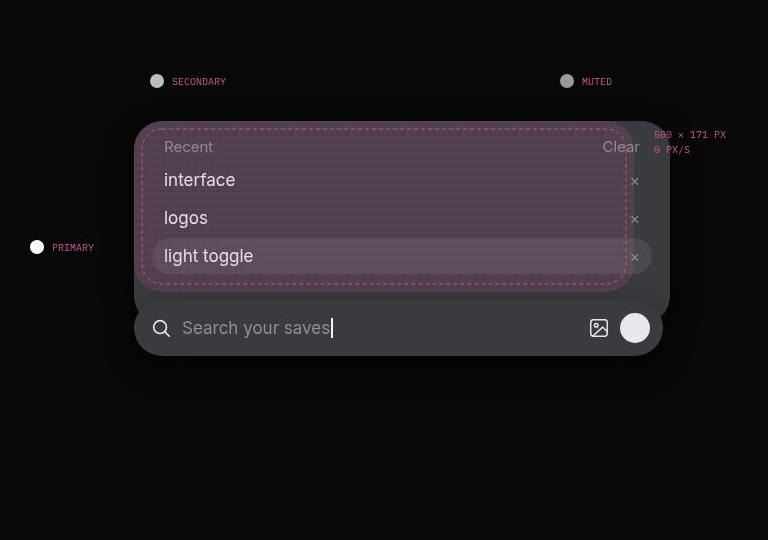
What came out: canvas #080808, the bar a fully rounded 500 × 56 (360 × 52 with a tag chip), the Recent panel 500 × 171 sitting 8 px above it, and a pink overlay around #D0569A on an 8 px grid. Colours sampled through the overlay are tinted, so I treated them as close, not exact.
03 — The spec
A designer agent turned those numbers into a spec for seven states: empty, focused, typing, loading, results, no results, error. Only three of those are actually in the video. The other four are inferences, and I want to be clear about that — the error and empty states are our guesses at what the component would do.
An earlier pass had gone the other way: a warm off-white "bronze" palette, because the name sounded like a colour. It looked fine and was nothing like the reference.
04 — Building with agents
The plan was to build the states straight into Paper. Paper Desktop exposes a local MCP server on my PC, so the agent wrote the artboards as batches of JSON-RPC calls and ran them on my machine — one script, one approval, seven artboards plus screenshots.
That worked the first time, for the light version. Eight artboards, twenty-five calls, a single click from me.
05 — What went wrong
Most of the time went into things that weren't design.
My PC dropped offline twice — once before anything ran, and again right as the dark batch was being copied over. The agent could prepare everything, but it couldn't touch Paper without the machine. I also found that some of this couldn't happen from a group chat with two agents: approvals for the PC only show up in a direct conversation.
Placing the new row was its own small problem: Paper puts artboards "in the best empty spot", so the batch had to read where the old row was first and position the new one below it.
06 — Result
While the PC was down, the agent rendered the same HTML in a headless browser and put it next to the video frames. That comparison is the most useful artifact of the whole thing.
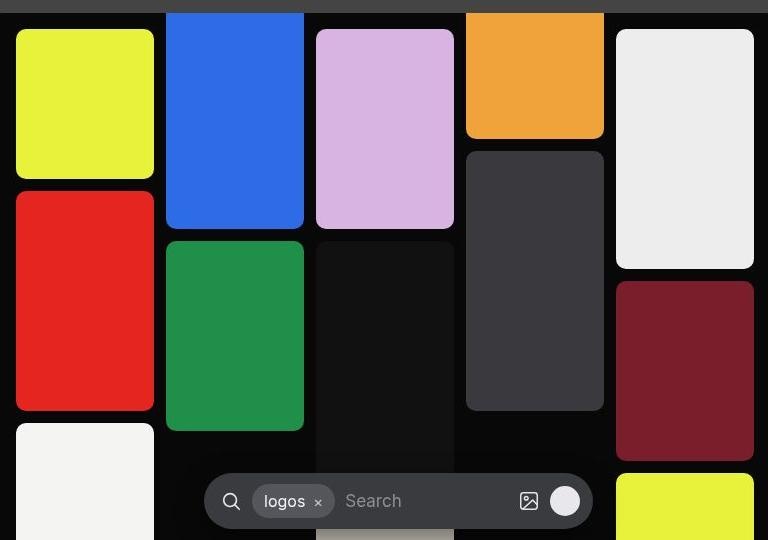
Close: proportions, colours, chips, the Recent rows, the debug style. Off: my bar takes more of the frame than his, the gallery is placeholder colour, the cursor and the motion aren't there yet. Next is the motion — the part I actually care about.